Building interactive maps with Leaflet (Markers, Popups and Events)
After displaying GPX data on a Leaflet map, I wanted to take the next step: making the map interactive.
Showing data on a map is useful, but it doesn't invite the user to interact with the information. This lowers the overall user interaction with the app.
With just a few building blocks like markers, popups and events you can turn a static map into something users can explore, click and react to.
In this post, we’ll look at how to do those things.
If you already have a basic Leaflet setup (for example using React Leaflet), this is a natural next step to make your map feel like an actual application.
Adding Markers and Popups
Markers are usually the first step when working with maps, but on their own they are pretty limited.
A marker shows where something is, but without additional context, it doesn’t tell the user much.
That’s why markers and popups are almost always used together. We already saw this in the blog post to setup your basic React Leaflet runtime.
Popups allow you to attach information to a specific location, making the map easier to understand and explore.
With React Leaflet, combining both is straightforward:
import { MapContainer, TileLayer, Marker, Popup } from 'react-leaflet';
export const MapView: React.FC = () => {
const position: [number, number] = [-32.011, 115.786];
return (
<MapContainer center={position} zoom={13} style={{ height: '600px', width: '100%' }}>
<TileLayer
attribution="© OpenStreetMap contributors"
url="https://{s}.tile.openstreetmap.org/{z}/{x}/{y}.png"
/>
<Marker position={position}>
<Popup>Look at that place!</Popup>
</Marker>
</MapContainer>
);
};
The position defines where the marker is placed using latitude and longitude.
The popup is attached directly to the marker and is shown when the user interacts with it by clicking on it. Since it supports JSX, you can structure the content however you like, from simple text to richer UI elements.
This combination already adds a lot of value, you can for example:
- highlighting points of interest
- adding descriptions or metadata
- giving users something to explore
At this point, the map starts to feel less like a static visualization and more like an interactive interface.
Handling user interactions
Adding markers and popups already makes your map more useful but it’s still mostly static.
The next step is to react to user interaction and give the user a real value.
Instead of just displaying information, you can respond to interactions like clicks. This is where your map starts to feel like an actual application.
With React Leaflet, you can attach event handlers directly to markers:
<Marker
  position={position}
  eventHandlers={{
    click: () => {
      navigator.clipboard.writeText(position.join(',')).then(
        () => console.log('Coordinates copied'),
        (err) => console.error('Copy failed', err),
      );
    },
  }}
/>
In this example, clicking on a marker copies its coordinates to the clipboard.
This might seem like a small detail, but it already shows how powerful event handling can be. Of course your general application UX/UI has to help the user understand that this feature works as described, but you get the idea.
Instead of just rendering the data, you can now:
- trigger actions
- interact with browser APIs
- connect your map to real workflows
This is the point where your map becomes more than just a visualization. It becomes part of your application logic and user interaction.
Working with map events
So far, we attached events directly to a marker (you can do this to other elements as well).
But sometimes you don’t want to react to an existing marker. Instead, you want to react to the map itself.
A common example is selecting a location by clicking anywhere on the map. So in this case you want the map itself to become the interactive area.
React Leaflet provides the useMapEvents hook for this that we can use in a new component:
import { useState } from 'react';
import { Marker, useMapEvents } from 'react-leaflet';
import type { LatLngExpression } from 'leaflet';

export const LocationMarker: React.FC = () => {
  const [position, setPosition] = useState<LatLngExpression | null>(null);

  useMapEvents({
    click(event) {
      setPosition(event.latlng);
    },
  });

  if (!position) {
    return null;
  }

  return (
    <Marker
      position={position}
      eventHandlers={{
        click: (evt) => {
          evt.originalEvent.stopImmediatePropagation();
          navigator.clipboard.writeText(position.toString()).then(
            () => console.log('Coordinates copy success'),
            (exc) => console.error('Error during coordinate copy', exc),
          );
        },
      }}
    />
  );
};
This component listens for clicks on the map.
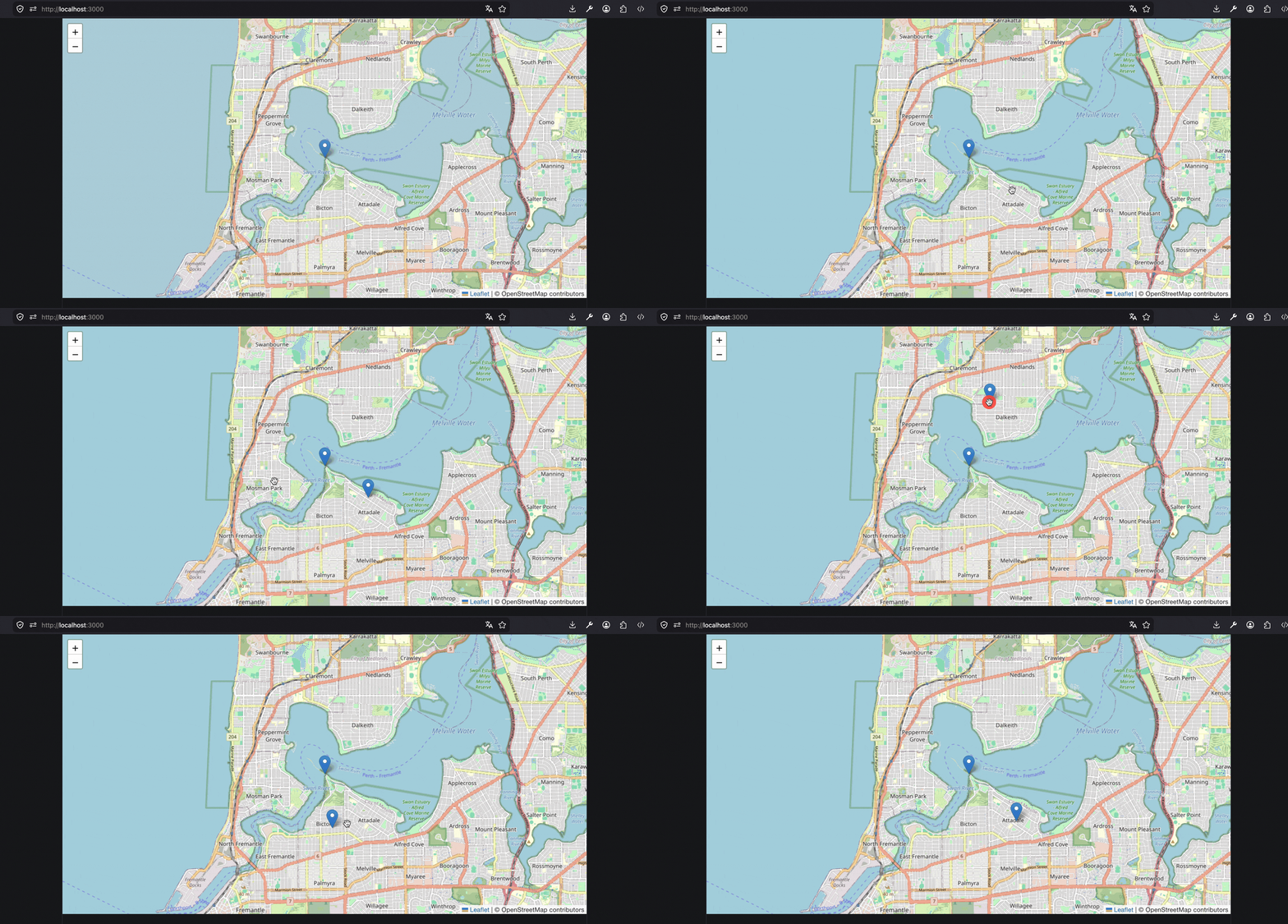
When the user clicks somewhere, the clicked coordinates are stored in state. Once a position exists, a marker is rendered at that location.
You can then use this component inside your map:
<MapContainer center={position} zoom={13} style={{ height: '600px', width: '100%' }}>
<TileLayer
attribution="© OpenStreetMap contributors"
url="https://{s}.tile.openstreetmap.org/{z}/{x}/{y}.png"
/>
<LocationMarker />
</MapContainer>
This pattern is useful for features like:
- selecting a location
- creating custom markers
- saving coordinates
At this point, the map is no longer just reacting to existing data. It can now collect new data from user interaction. If you're following along your application should look like this at the moment:
A small gotcha
If you combine marker events and map events, you might run into an unexpected behavior:
Clicking on a marker will also trigger the map click event.
This happens because the click event bubbles up from the marker to the map.
To prevent this, you can stop the event propagation:
click: (e) => {
  e.originalEvent.stopImmediatePropagation();
};
This ensures that marker clicks and map clicks are handled independently.
Connecting it to real use cases
Up to this point, we’ve looked at individual building blocks like markers, popups, user interactions and map events.
On their own, these are simple features. But combined, they enable real-world use cases.
If you think back to the previous post about GPX files, you already have a map that displays a route.
With the concepts from this post, you can now extend that setup:
- highlight specific points along a track
- attach additional information to waypoints
- allow users to click on the map to create new points
- capture coordinates for further processing
And this is where things start to get interesting.
Where to go next?
At this point, you’ve turned a static map into something interactive.
You can display data, attach context to it and react to user input, which already opens up a wide range of possibilities.
But this is still just the beginning (as you can see in the Leaflet Docs).
A natural next step is to combine these concepts with external data sources. Instead of working with static positions, you can fetch and display dynamic data and make your map respond to it.
Another interesting direction is to build small tools on top of this setup, for example something to:
- selecting and storing locations
- editing or extending routes
- connecting map interactions to backend logic
As with most things, the best way forward is to experiment.
Take the concepts from this post, combine them with your own ideas and see where it leads. I'll do this definetly!
If you want to keep updated on the upcoming experiments and ideas be sure to subscribe to the newsletter.
Until then! Thanks